- Java Annotation support. RuntimeVisibleAnnotations, RuntimeInvisibleAnnotations, RuntimeVisibleParameterAnnotations, and RuntimeInvisibleParameterAnnotations attributes are supported.
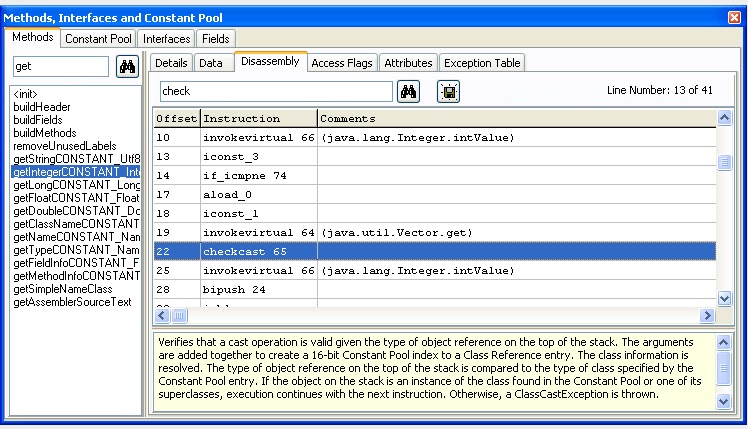
- Improvements and many new features in "View" - "Attributes", "Methods, Interfaces and Constant Pool" and "Fields" forms. Added search capabilities in "Methods" and "Constant Pool" tabs. Specific information for attributes is available and annotations are displayed in Treeview. "Save to file" option added. Bugfix in "Exception Table" tab. "Attributes" form gives a complete description of all ClassFile attributes. Additional "Fields" tab is added.
- Added a new search tool "Search for files inside compressed archives" (.JAR, .ZIP, .WAR, .EAR and .APK). This tool enables users to search for files by file name and a word or phrase in the file. The results list can be sorted by clicking at column header and includes detailed information about files.
- Added a new tool "Imports Viewer". Lists import statements of selected class file.
- Added a new tool "Methods Viewer". Shows the methods of selected class file with sorting capabilities. Lists access_flags, descriptors, method signatures, attributes and code length. The results list can be exported to tab-delimited text file.
- Added capability to calculate .DEX file signature and checksum with "CRC MD5 SHA-1 Calculator" tool. Users can also calculate the Adler-32 and SHA-256 hashes of a file or string.
- Improvements in "Export to HTML". Compared to the previous version - it is much more powerful now. Unicode conversion allows multi-language documents.
- Added a drag-and-drop functionality in "Archiver" tool.
- Added a "Tree View" button in "Archiver". Shows the selected archive (.jar, .zip, .war, .ear, .apk) in Treeview with export to .XML capability.
- Added a "Whole class tree" option in "Decompile more files" tool. Decompiles all .class files located in all subdirectories of the selected directory and creates output files in subdirectories of the destination folder according to package names of classes.
- "Browse for files" button added in "Run" tool. Useful to pass the file names as arguments to the main() method.
- Bugfixes in syntax highlighting.
Sunday, May 8, 2011
Java Decompiler New features in version 3.11.11.95
Java Decompiler
Introduction
The “Java Decompiler project” aims to develop tools in order to decompile and analyze Java 5 “byte code” and the later versions.
JD-Core is a library that reconstructs Java source code from one or more “.class” files. JD-Core may be used to recover lost source code and explore the source of Java runtime libraries. New features of Java 5, such as annotations, generics or type “enum”, are supported. JD-GUI and JD-Eclipse include JD-Core library.
JD-GUI is a standalone graphical utility that displays Java source codes of “.class” files. You can browse the reconstructed source code with the JD-GUI for instant access to methods and fields.
JD-Eclipse is a plug-in for the Eclipse platform. It allows you to display all the Java sources during your debugging process, even if you do not have them all.
JD-Core, JD-GUI and JD-Eclipse are free for non-commercial use. This means that JD-Core, JD-GUI and JD-Eclipse shall not be included or embedded into commercial software products. Nevertheless, these projects may be freely used for personal needs in a commercial or non-commercial environments.
Main Features
JD-Core and JD-GUI are written in C++. This allows an extremely fast decompilation and a display.
JD-Core does not require the Java runtime environment for its functioning, therefore no special setup is required.
JD-Core works with most current compilers including the following:
jdk1.1.8
jdk1.3.1
jdk1.4.2
jdk1.5.0
jdk1.6.0
jdk1.7.0
jikes-1.22
harmony-jdk-r533500
Eclipse Java Compiler v_677_R32x, 3.2.1 release
jrockit90_150_06
JD-Core supports the following new features of Java 5:
Annotations
Generics
Type “enum”
JD-GUI supports Drag and Drop.
JD-GUI supports JAR files.
JD-GUI displays color coded Java source code.
JD-GUI allows you to browse the “class” files hierarchy.
JD-GUI displays “log” files, and allow you to decompile “class” files appearing in Java stack traces.
JD-Core, JD-GUI and JD-Eclipse use the excellent cross-platform wxWidgets toolkit.
The “Java Decompiler project” aims to develop tools in order to decompile and analyze Java 5 “byte code” and the later versions.
JD-Core is a library that reconstructs Java source code from one or more “.class” files. JD-Core may be used to recover lost source code and explore the source of Java runtime libraries. New features of Java 5, such as annotations, generics or type “enum”, are supported. JD-GUI and JD-Eclipse include JD-Core library.
JD-GUI is a standalone graphical utility that displays Java source codes of “.class” files. You can browse the reconstructed source code with the JD-GUI for instant access to methods and fields.
JD-Eclipse is a plug-in for the Eclipse platform. It allows you to display all the Java sources during your debugging process, even if you do not have them all.
JD-Core, JD-GUI and JD-Eclipse are free for non-commercial use. This means that JD-Core, JD-GUI and JD-Eclipse shall not be included or embedded into commercial software products. Nevertheless, these projects may be freely used for personal needs in a commercial or non-commercial environments.
Main Features
JD-Core and JD-GUI are written in C++. This allows an extremely fast decompilation and a display.
JD-Core does not require the Java runtime environment for its functioning, therefore no special setup is required.
JD-Core works with most current compilers including the following:
jdk1.1.8
jdk1.3.1
jdk1.4.2
jdk1.5.0
jdk1.6.0
jdk1.7.0
jikes-1.22
harmony-jdk-r533500
Eclipse Java Compiler v_677_R32x, 3.2.1 release
jrockit90_150_06
JD-Core supports the following new features of Java 5:
Annotations
Generics
Type “enum”
JD-GUI supports Drag and Drop.
JD-GUI supports JAR files.
JD-GUI displays color coded Java source code.
JD-GUI allows you to browse the “class” files hierarchy.
JD-GUI displays “log” files, and allow you to decompile “class” files appearing in Java stack traces.
JD-Core, JD-GUI and JD-Eclipse use the excellent cross-platform wxWidgets toolkit.